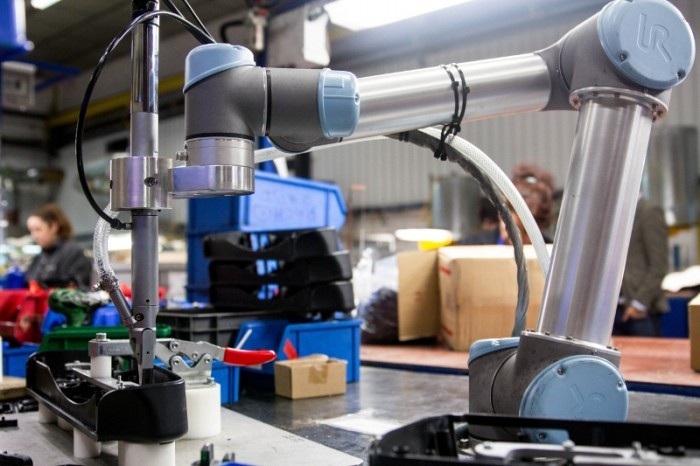
Featured

5 Facts About Robot Software You Should Know

When it comes to robots, most people don’t know much about them, except for the knowledge they’ve seen on Tv. Huge metallic objects that will one day rise and take over humanity.

But that can never be farther from the truth. When looking to invest in automation and robots, you need to know the ins and outs of technology. How it works, what makes it work, and how it can help take your business to the next level.

You also need to do your research on robot software. With so many things happening in robotics, you can’t afford to forget about the software.

Below, we’ll show you five crucial fact about robot software.

1.     There’s no ‘one for all’ software

Just as there are numerous types of robots in the market today, there are also hundreds of robot software in the market. You, therefore, shouldn’t fall prey to the ‘one for all’ notion. Depending on your robot’s design and specifications, you should get software compatible with it.

Keep in mind that both the software and hardware of the robot need to be compatible with the software you choose. This is why what works so well for your competitor may not be successful for you.

2.     Robot software programming doesn’t have to be hard

The term ‘programming’ sends chills among most people who’ve never had experience in the field. But if you’ve done some bit of it, you know that it’s merely a few simple instructions. And with the development of robotic technology, programming robots is much easier than you think.

Companies like Universal Robots have come with easier to program collaborative robots which don’t require any prior experience to programming. This makes it easier for your employees to work with the robot.

It’s, therefore, up to you to choose the complexity of the software you want for your robots. The easier it is, the better for your production.

3.     Robots security is a thing

Before becoming a machine, think of a robot as any other software on your computer. The same cybercriminal attacks that your computer and mobile phases every day can also be redirected to the robots – which is scary.

It all boils down to how secure the OS and other software you chose for the robot are.

Like all other software, the robot software can be manipulated to cause damage to your products, harm your employees and eventually sabotage your production.

As such, you have to be mindful of the security of your robot software. Seek help from experts to find ways to improve the security and privacy of your robots and the data it stores.

4.     Cost of robot software is going up!

As the cost of robots come plummeting down, the costs of robot software is taking a different direction. With so many features being integrated into their designs and functionalities, you can only expect their price to sky-rocket.

For instance, developers are now working more than just precision and speed in mind. They have to consider the safety, security and convenience of this software for manufacturers. This drastically increases the prices.

5.     Your robot is as good as its software

To sum it up, the one thing you have to keep in mind is that your robot is only as good as its software. It can complete the tasks specified in its programming, and it can adapt to just as many tasks as the software allows.

This is why it’s crucial to take your time before investing in robotic software. You need to clearly define your goals and expectations from the software, and find out its capability beforehand.

With good software, only the skies can limit your production prowess.

Final Thoughts

When looking to invest in robots for your industry, you need to go beyond the surface and really learn more about them. Find out how well they fit in your production space and how well they suit your industry goals.

The more informed you are about the robot and its software, the better you’ll be when purchasing the robot!
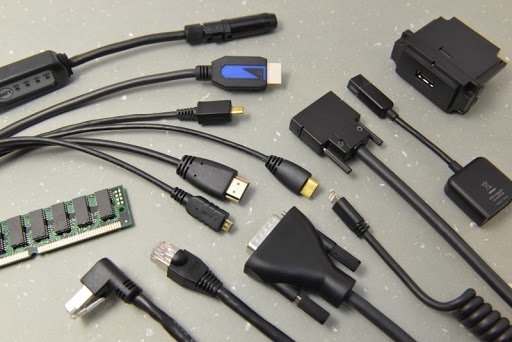
What are the most common types of data cables?

Today, there are several types of cables that have become extremely popular for businesses of all sizes. There are many different kinds of cables, and in order to understand them, you need to first understand a little bit about just how they work. What are the most common types of data cables? The answer may surprise you!

optical data cables – These cables are pretty much what you would think. They are used primarily for high speed internet, but they can also be used for other applications as well. However, one of the most common uses is for computer networking. This is because these cables are able to transmit large amounts of information very quickly, which is necessary in networking situations.

coaxial cables – These are another one of the main categories. These cables are often used for high speed internet, but they can also be used for other things as well. Many coaxial cables are used for home entertainment systems as well, since they can transfer high resolution video from one source to another at incredibly fast speeds. While they are great for getting a variety of signals, it is important to note that you should never purchase a cable that is rated for high speed unless you are sure that it is what you need. There are some cable providers out there that will sell you a cable with the highest speed rating, but if it is not what your system uses, then it won’t do you any good!

USB data cables – Now, we come to the next most popular type of data cables. These are generally used with laptops, but they can also be used with desktop computers. In fact, the USB data cable may even be considered the ultimate data cable. Think about all of the different ways in which you can transfer information from one source to another. With a USB data cable, you can transfer files from your computer to a flash drive or even over the Internet using your computer’s browser.

You may even have a lot of unused data cables lying around that you don’t know what to do with. Fortunately, this is where networking products like Ethernet cables come into play. When you buy an Ethernet cable, you will find that you have a lot of flexibility when it comes to expanding your network. If you have multiple computers on your network, you can run several different Ethernet lines between them. This means that you can send email to all of your computers from one computer. You can even talk to people over the Internet wirelessly if you choose to!

Now that you have a basic understanding of what are the most common types of data cables, you should know that the right cable will work great for your needs. Once you get the right cable, be sure to keep an eye out for expiration dates so that you don’t end up wasting money on outdated technology. Check out the prices at various retailers to see if you can find a bargain. The economy isn’t going to change that much in the next year or two, so saving money today means that you will be able to spend more later. Visit convergentbydesign.com for more information.

Everything You Should Know About the Smart Lighting System

So many people still use the traditional lighting system, which has been around for centuries. However, with the trends in technology, smart lighting is becoming popular for many homes and businesses. You can now take control of your lighting system without having to fumble with switches all the time. 

If you plan to upgrade your lighting system, Led ibond can handle all the installation without a hassle. However, you should know a few things before you hire any company to do the installations.

What is smart lighting?

If you have never installed a smart lighting system before, you should know what it is and why you should consider installing it. Typically, the smart lighting systems work through your Wi-Fi network. You only need to connect the system to your network, control it using your Smartphone, and start enjoying the benefits.

With this system, you can easily control the temperature, color, and brightness, and set them however you please. You can also set schedules for the lights to switch on and off at designated times.

For instance, if you are not home, you can set the lights to switch on at night and off in the morning. This will keep prying people and burglars away because they will think you are still at home. 

The smart lighting system also allows you to use voice commands to control them. Once you integrate the system to your voice commands such as Google Assistant and Amazon Alexa, you can command the lights to dim, increase brightness, or change color whenever you want. 

How does this system work?

Typically, the smart lighting system requires a bridge that links them to your Wi-Fi network. It is through this bridge that you can control the system using your Smartphone.

However, newer versions do not require a hub, which makes them even more amazing. This means that you can connect them directly to your Wi-Fi network, making them very convenient as you do not need to buy the hub.

Some smart lighting systems can connect or communicate with each other through the Zigbee wireless protocol. This protocol works like Wi-Fi, but in this case, the lights communicate with each other to relay the message. 

Types of smart light bulbs available

Many smart light bulbs are available in the market, and they all have unique features. Some of the models you will find include GLS light bulbs, GU10 spotlights, RGB, and LED strips. All these lights come with different features. So, if you plan to install the smart lighting system, you should select the right bulbs to integrate with the system.

With a smart lighting system, you can easily control the mood or atmosphere. So, if you are taking a nap, watching a movie, reading, or listening to music, you can customize the lighting system to respond accordingly. For instance, if you want to take a nap, you can set the bulbs to produce dim light that creates a soothing environment for sleeping.

Smart lights and Wi-Fi problems

Sometimes you may experience downtime with your Wi-Fi system, which means you may not be able to control the smart lighting system. If you experience slow internet connections or go down completely, worry not because the lights can still go off. Manufactures make sure the system shuts itself off after a certain period of no activity takes place.

If your lights use a hub to connect to your home Wi-Fi, you can still control it without an internet connection. However, you may lose some functionality without Wi-Fi, but the best thing is that you can control the lights even with no connection.

With many people integrating smart lighting into their homes, this system will soon become an aspect of IoT. If this happens, you can have a more comfortable and better life because you will be able to control many functionalities using your Smartphone or voice. Although there are disadvantages to this system, the benefits overcrowd them by far. If you have not installed this system, it is time to consider doing so to be part of the amazing Smart World.

How to Choose the Right Robot Software

Robotic process automation (RPA) has been one of the best inventions ever incorporated in the industries today. RPA provides solutions for most of the problems facing manufacturers, making it an indispensable tool.

However, with every industry running to get hands-on automation robots, the one thing that’s become clear is that most manufacturers don’t understand robot software -Or at least how to choose them.

This creates a big problem for the industries, as the wrong robot software can drastically affect your production. So, what should you look for when choosing a robot software?

Here are five factors you should keep in mind:

1.     Compatibility with your systems

When choosing a robot software, compatibility with your existing frameworks is always the first priority. You want to find a software that easily works with the technology you already have in place.

Look into more than just the OS, dig deeper into the libraries and related files ensuring they can work with your production. If you’re going with Linux-based systems, then ensure that the software you choose supports the Linux files. If middle-range software, then make sure you have the system to support it.

With compatible software, integration into your systems becomes faster and easier. It also fosters more flexibility and makes development much easier.

2.     Hardware issues

Another vital issue is your hardware. Even if the software is compatible with all the systems in place, if the hardware doesn’t support it, there’s nothing you can achieve.

You, therefore, need to ensure that you have all the facts about your robot’s hardware. Find out the specifications and what it can or can’t accommodate. Most developers design robot hardware with specific distribution systems in mind.

Therefore, while it may work with one software, it may be more effective when used with specific software. So do your research and ensure that the software you choose gets the best of the robot hardware.

3.     Software scalability

One of the primary reasons for industries to invest in robots is to improve their scalability. With such high speed, accuracy and efficiency, robots work way faster than workers improving the industry’s performance.

But this isn’t always the case when you have the wrong software for your robots. You need to ensure that the robot software you choose has the capacity to scale up.

This includes multi-tasking, reprogramming to different tasks and a big enough memory space to keep process procedures. You don’t want to keep programming the robot each time you want to repeat a task!

A good robot software allows you to track records of your production while also allowing you to dial-up or down depending on the volume demands. It should also have the capacity to learn new procedures and steps, making production expansion easier.

4.     Easy, friendly user interface

An industrial robot is a sophisticated piece of technology. But this doesn’t mean its software has to be complex as well. To make the most out of a robot, all your employees need to be able to operate it efficiently.

That’s why having a clean and easy user interface is a huge priority. The robot software should be easy to navigate and use different functionalities.

The programming side of it should also be easy for most people. Your IT team should be able to easily configure the codes, to incorporate new tasks and processes.

The more complex a software is, the harder it is to modify and hence, takes longer to integrate to your system.

5.     Analysis features

Being a computer of sorts, your industrial robot should also provide you with accurate analytics of your production. The robot software should incorporate some complex calculations to give an idea of your workflow in production.

You should also be able to optimize this software to include some key analysis features you want in the report.

Final Thoughts

Finding a good robot software is just as important as purchasing the robot itself. The better your software is, the better the robot will perform in production. It’s, therefore, paramount that you choose the right software for your automation.

With the tips above, we’re confident that you’ll make a smart decision when choosing a robot software for your metal friend!

know about Apple Card

Apple Card has generated a huge amount of interest. Here is everything we know so far about the card, updated to the present and with links to additional resources.

Introducing Apple Card
“Apple Card is designed to help customers lead a healthier financial life, which starts with a better understanding of their spending so they can make smarter choices with their money, transparency to help them understand how much it will cost if they want to pay over time and ways to help them pay down their balance,” said Jennifer Bailey, Apple’s vice president of Apple Pay, announcing the service.

So, what do we know?

Late breaking news on Apple Card
We were already aware the card would link up with a clear app, offer up to 3% cashback on Apple purchases, and more.

[ Related: Wireless chargers for Apple’s iPhone X ]
Since then we’ve learned there will also be an iPad app, and it will be possible to raise financing for some products (particularly Apple products).

Reuters confirms that financing payments won’t attract interest so long as customers remain on schedule – so you might get 3 percent cash back on your next Mac and pay zero percent interest on the purchase over 24-months, for example.

You need an iPhone, iPad
Apple Card is built to work with your Wallet and you need to own an iPhone to set it up. Each card is uniquely connected to your device. An Apple Card account app will be available for iPads.

You need an Apple ID
You must have an Apple ID/iCloud account and must have two-factor authentication enabled on that account.

[ Take this mobile device management course from PluralSight and learn how to secure devices in your company without degrading the user experience. ]
How long does it take to sign up?
You can join the service in a few minutes and begin using it almost immediately.

How do I apply for Apple Card?
If you are 18 or over and a U.S. resident you can apply for the card. At time of writing you need an invitation from Apple to do so, but you can register interest here.

Once you receive the invitation just follow these steps to signup for Apple Card:

Open Wallet app
Tap the plus button (top right).
Choose Apple Card, then tap Continue.
You’ll be asked for your personal details, once you enter these tap Next.
You will be given your terms for use of the card.
NB: The process requires a hard search of your credit history.
[Also read: Apple Card: The industry reacts]
Apple Card is coming in August
Apple CEO Tim Cook recently confirmed Apple Card ships in August in the U.S.

When will Apple Card be available outside the U.S.?
We don’t know. We understand Apple is discussing it.

How do I activate the card?
Tap the physical card with your iPhone when your receive it to activate it.

Where are the card numbers?
You’ll find no long number on Apple Card – to get that number you must look at it inside the Wallet app. Even then you will only see the last 4-digits of the actual card number.

How do I use a card without a number?
Apple provides you with a virtual card number and CVV code inside the app. You can keep this number as long as you like and use it to pay for items online or over the phone.

Be yourself; Everyone else is already taken.

— Oscar Wilde.

This is the first post on my new blog. I’m just getting this new blog going, so stay tuned for more. Subscribe below to get notified when I post new updates.

Design a site like this with WordPress.com
Get started